
Payroll Tips: Salary Structure Assignment and Employee Selection in Frappe HR
Frappe HR provides flexible payroll configuration options that help organizations manage employees with different salary packages while simplifying payroll processing. Two common payroll scenarios involve assigning a single salary structure to multiple employees and generating payroll only for selected employees.
This guide explains how to handle both situations efficiently.
Use Case 1: Assigning One Salary Structure to All Employees
In many organizations, employees may have different salary amounts but follow the same salary structure framework.
Instead of creating separate Salary Structures for each employee, you can create a single Salary Structure and use formulas to calculate salary components dynamically.
How It Works
Within the Salary Structure:
- Open the Salary Structure.
- Select the required Earning or Deduction component.
- Add a Formula for the component.
- Save the Salary Structure.
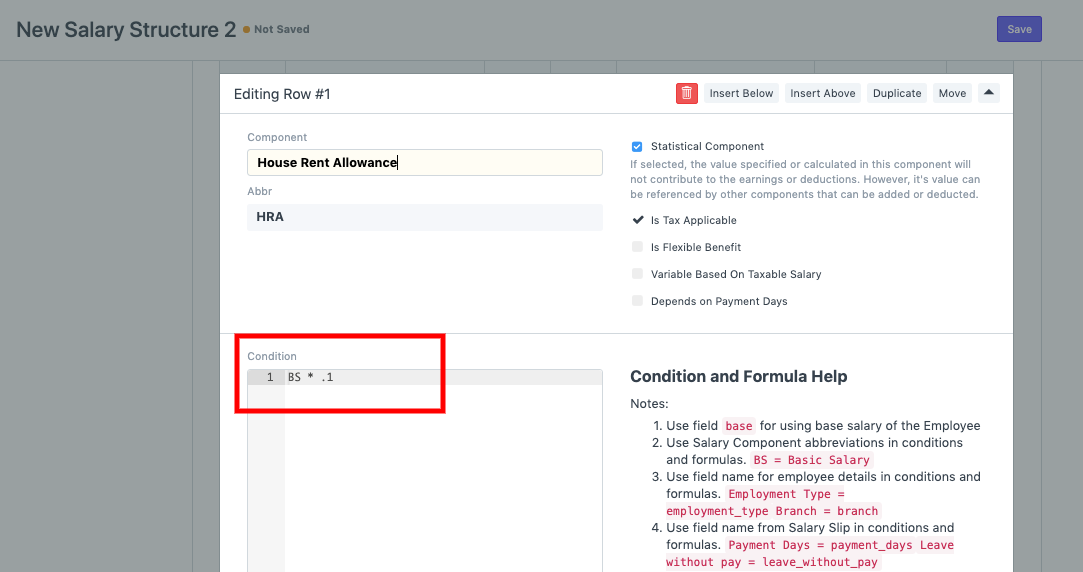
The formula can calculate component values based on employee-specific salary information, ensuring that each employee receives the correct earnings and deductions even while using the same Salary Structure.
A single Salary Structure can be assigned to multiple employees while formulas automatically calculate individual salary amounts.
Benefits of Using Formula-Based Salary Structures
- Reduces the number of Salary Structures to maintain.
- Ensures consistency across payroll calculations.
- Simplifies salary administration.
- Supports employee-specific salary variations.
- Makes future payroll management easier.
TIP
Whenever possible, use formula-based Salary Components instead of creating multiple nearly identical Salary Structures. This significantly reduces payroll maintenance effort.
Use Case 2: Generating Payroll for Selected Employees Only
By default, when processing payroll, clicking the Get Employees button fetches all eligible employees for the selected payroll period.
However, there are situations where payroll needs to be generated only for a specific group of employees.
Examples include:
- A specific department.
- A particular branch.
- A certain designation.
- A pilot payroll run for selected employees.
How to Fetch Selected Employees
While creating a Payroll Entry:
- Select the Payroll Period and Payroll Date.
- Use the available filters before clicking Get Employees.
- Filter employees based on:
- Department
- Branch
- Designation
- Click Get Employees.
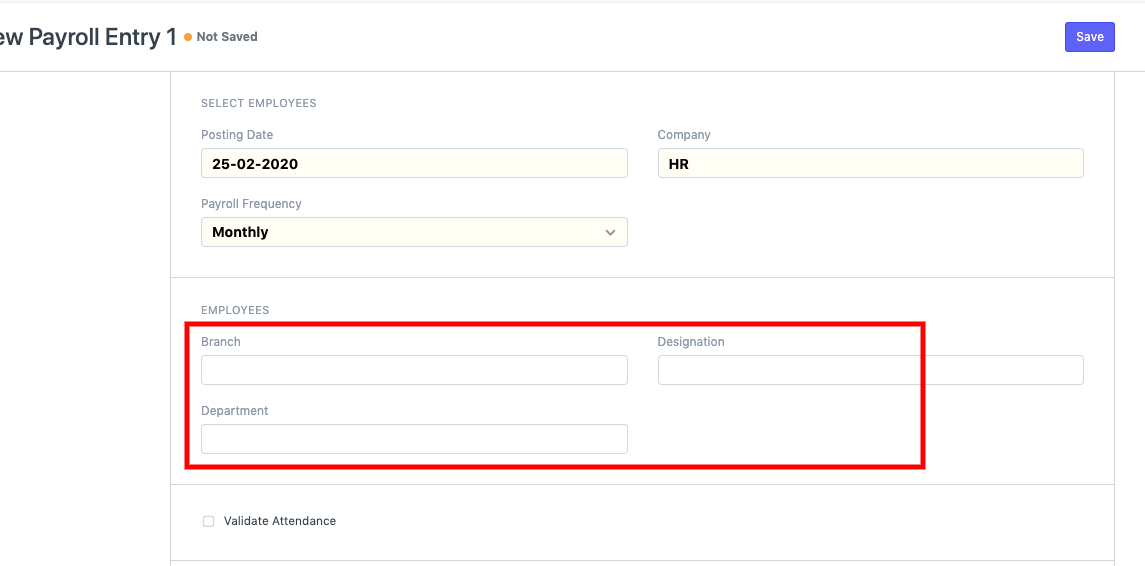
The system will fetch only employees matching the selected filters.
Using filters before clicking “Get Employees” ensures that payroll is generated only for the intended group of employees.
Advantages of Payroll Filtering
- Process payroll department-wise.
- Run payroll separately for branches.
- Generate payroll for specific designations.
- Reduce errors during payroll processing.
- Improve control over payroll batches.
IMPORTANT
Filters must be applied before clicking “Get Employees”. Once employees are fetched, only the matching employees will be included in the payroll process.
Best Practices
- Use formula-based Salary Structures whenever employees share a common compensation framework.
- Regularly review payroll filters before generating salary slips.
- Test formula calculations before assigning Salary Structures to employees.
- Use department or branch filters when processing payroll in phases.
- Verify employee lists before creating Salary Slips.
NOTE
Using a single Salary Structure does not mean all employees receive the same salary. Formula-based components allow earnings and deductions to vary according to each employee’s assigned salary values.
Related Topics
- Salary Structure
- Salary Component
- Salary Structure Assignment
- Payroll Entry
- Salary Slip
- Payroll Processing
- Formula-Based Salary Components
SUMMARY
Frappe HR allows organizations to simplify payroll management by using a single formula-based Salary Structure for multiple employees. Salary amounts are calculated individually using component formulas. Additionally, Payroll Entries can be restricted to selected employees by applying filters such as Department, Branch, or Designation before fetching employees, enabling more controlled and efficient payroll processing.

