
How to Configure Flexible Benefits in Frappe HR
Flexible Benefits allow employees to claim specific benefits based on their individual needs while staying within limits defined by the organization. These benefits may include health insurance, telephone reimbursement, fuel allowances, wellness programs, pension contributions, and other employee welfare schemes.
Frappe HR enables organizations to manage Flexible Benefits through Salary Components, Employee Benefit Claims, Salary Structures, and Payroll processing.
What Are Flexible Benefits?
Flexible Benefits are employee benefits that can be claimed against a predefined allowance or annual limit.
Instead of paying a fixed benefit amount every month, employees can submit claims for eligible expenses and receive reimbursement through payroll.
Common examples include:
- Health Insurance Reimbursements
- Telephone and Internet Expenses
- Fuel and Travel Allowances
- Medical Benefits
- Wellness Programs
- Pension and Retirement Benefits
Flexible Benefits allow employees to claim only the benefits they actually use, making compensation packages more personalized and efficient.
1. Configure the Salary Component
The first step is to create or edit the Salary Component that will be used for the Flexible Benefit.
While configuring the Salary Component:
- Open the required Salary Component.
- Enable the Is Flexible Benefit checkbox.
- Enter the Max. Benefit Amount for the year.
- Enable Pay Against Benefit Claim if employees will receive the benefit through submitted claims.
- Save the Salary Component.
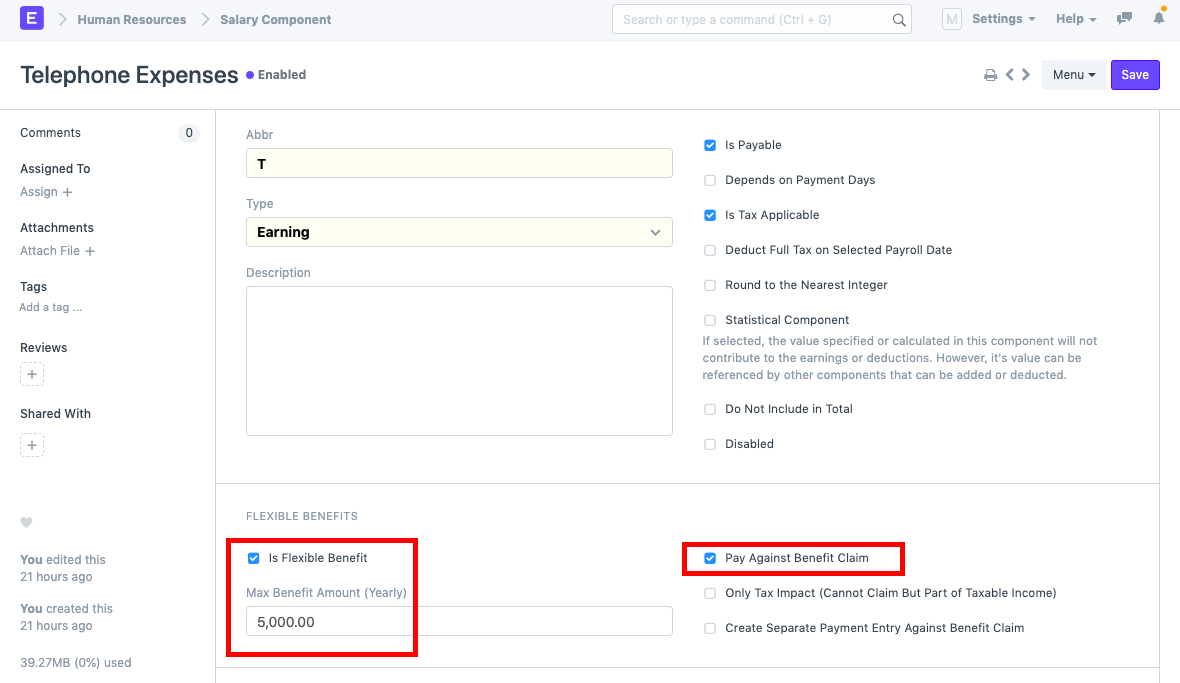
The “Pay Against Benefit Claim” option ensures that benefit amounts are paid only when employees submit eligible claims.
2. Add the Component to a Salary Structure
Next, create or update the Salary Structure assigned to the employee.
While adding the Flexible Benefit component:
- Add the Flexible Benefit Salary Component.
- Set the Amount to 0.
- Enter the applicable Max Benefits Amount.
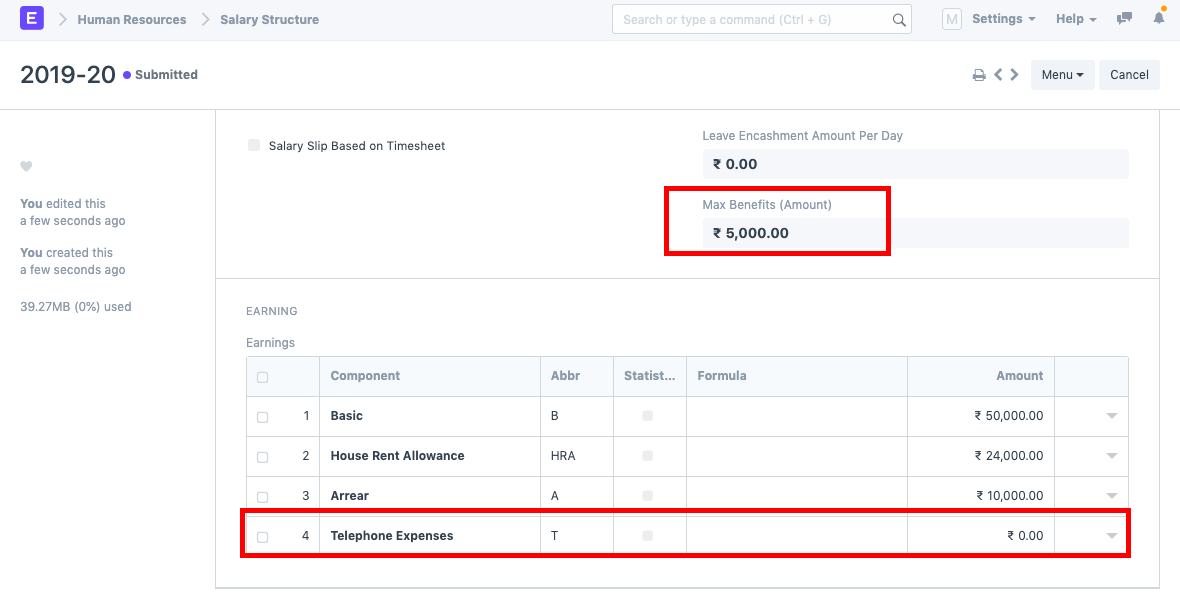
The amount remains zero because actual payments are determined by approved employee claims.
Flexible Benefit amounts are not fixed in the Salary Structure and are instead populated through approved benefit claims.
3. Assign the Salary Structure to the Employee
After configuring the Salary Structure:
- Create a Salary Structure Assignment.
- Select the employee.
- Assign the Salary Structure.
- Submit the assignment.
This makes the Flexible Benefit component available for payroll processing.
4. Create an Employee Benefit Claim
Employees can now submit benefit claims for eligible expenses.
To create a claim:
- Open Employee Benefit Claim.
- Select the Employee.
- Enter the Claim Date.
- Select the Flexible Benefit Component.
- Enter the Claimed Amount.
- Submit the claim.
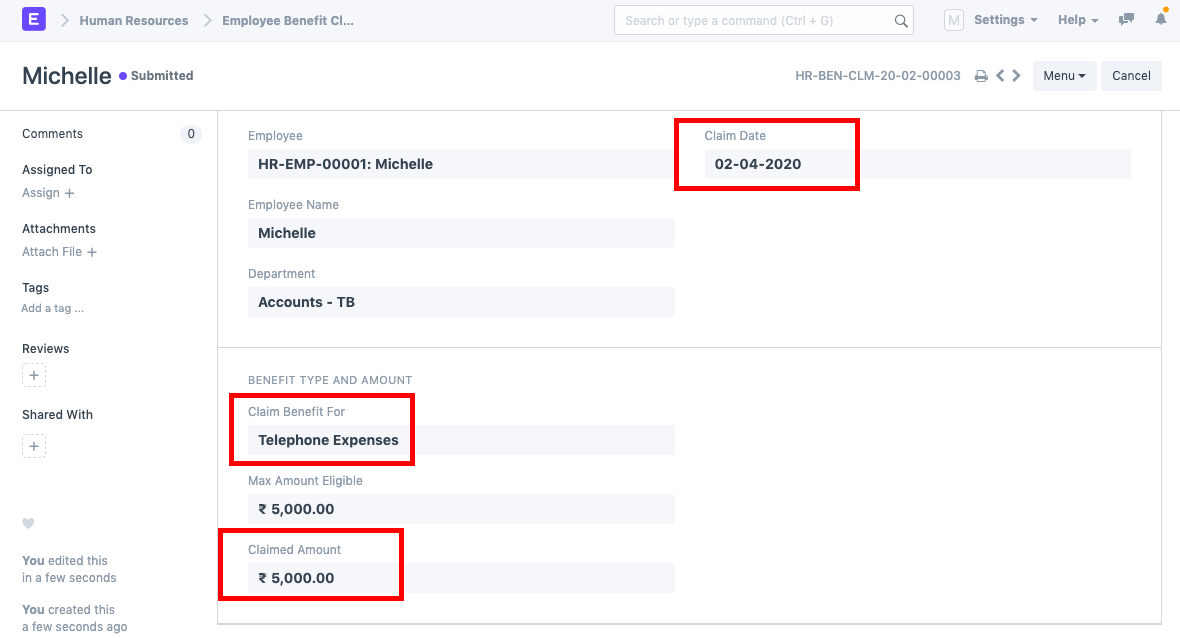
The claim amount is validated against the configured maximum benefit limits.
Only approved and eligible benefit claims are considered during payroll processing.
5. Process Payroll
Once benefit claims have been submitted and approved:
- Create a Payroll Entry.
- Select the payroll period.
- Fetch employees.
- Create Salary Slips.
During Salary Slip generation, Frappe HR automatically retrieves eligible Employee Benefit Claims and updates the corresponding Flexible Benefit component.
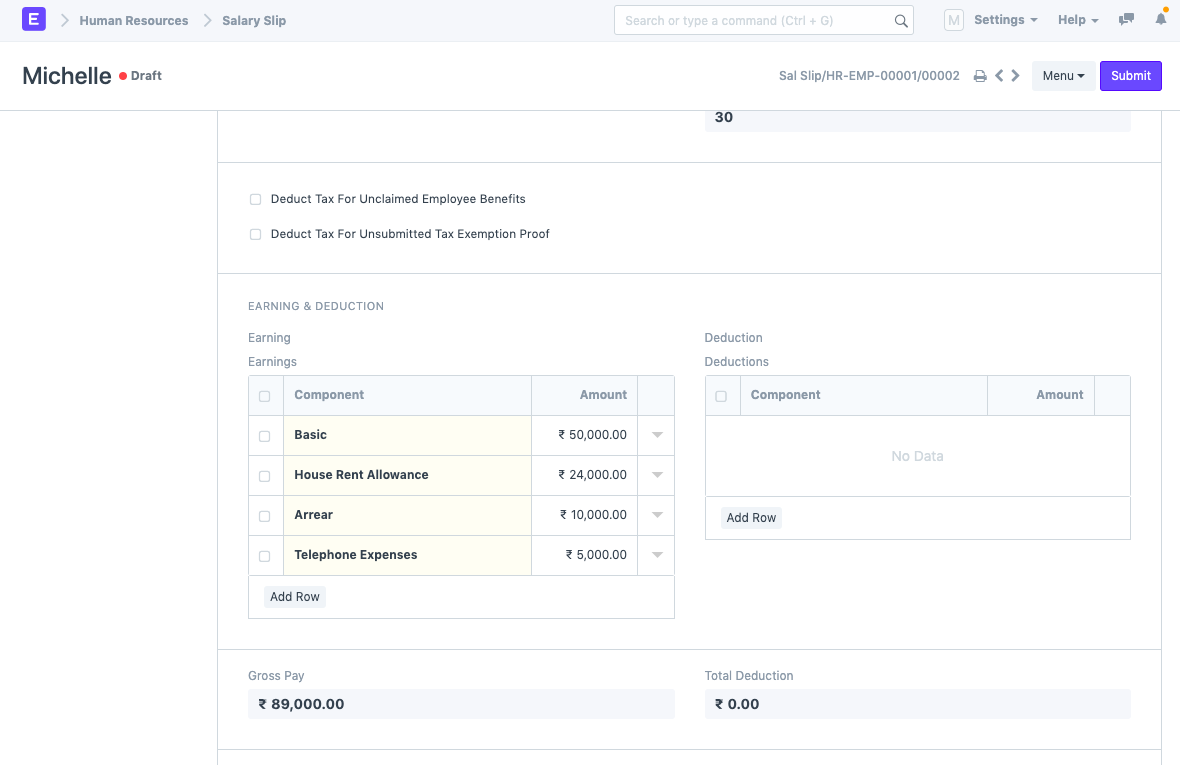
The approved claim amount is automatically added to the employee’s Salary Slip during payroll processing.
How Flexible Benefits Work
The overall process follows this sequence:
Salary Component
      ↓
Salary Structure
      ↓
Salary Structure Assignment
      ↓
Employee Benefit Claim
      ↓
Payroll Entry
      ↓
Salary Slip
Once payroll is processed, the approved benefit claim amount appears as an earning component in the employee’s Salary Slip.
Benefits of Using Flexible Benefits
- Provides personalized employee compensation packages.
- Reduces unnecessary benefit payouts.
- Allows reimbursement-based benefit management.
- Improves payroll accuracy.
- Ensures compliance with annual benefit limits.
- Offers better transparency in employee claims.
IMPORTANT
The Salary Component must be marked as “Is Flexible Benefit” and “Pay Against Benefit Claim” must be enabled if claims are required for reimbursement.
TIP
Set realistic annual benefit limits and clearly communicate claim eligibility criteria to employees to ensure smooth benefit administration and payroll processing.
Related Topics
- Salary Component
- Flexible Benefit
- Employee Benefit Claim
- Salary Structure
- Salary Structure Assignment
- Payroll Entry
- Salary Slip
- Employee Benefits
SUMMARY
Frappe HR allows organizations to manage Flexible Benefits through configurable Salary Components and Employee Benefit Claims. By enabling the “Is Flexible Benefit” option, defining annual benefit limits, assigning the component through a Salary Structure, and processing approved Employee Benefit Claims, organizations can automatically include eligible benefit reimbursements in employee Salary Slips during payroll processing.

