
How to Configure Automatic Income Tax Calculation in Frappe HR
Frappe HR can automatically calculate employee income tax during payroll processing. By configuring tax slabs, employee tax declarations, and salary components correctly, the system calculates income tax deductions and additional taxes such as Education Cess without requiring manual intervention.
This feature is especially useful for organizations following the Indian taxation system, where tax calculations depend on income tax slabs and employee tax exemption declarations.
1. Configure Income Tax Slabs in the Payroll Period
The first step is to define Income Tax Slabs within the Payroll Period.
These slabs should be configured according to the latest government tax regulations.
You can also include:
- Standard deductions.
- Additional taxes.
- Tax conditions.
- Applicable exemptions.
Income Tax Slabs serve as the foundation for automatic tax calculation and should always match current government guidelines.
IMPORTANT
If standard deductions or tax exemptions are applicable under government regulations, they should be configured within the Income Tax Slab setup to ensure accurate tax calculations.
2. Record Employee Tax Exemption Declarations
Employees can reduce their taxable income by declaring eligible investments and expenses.
These declarations can be recorded using the:
Employee Tax Exemption Declaration
document.
Common declaration categories include:
- Public Provident Fund (PPF)
- Life Insurance Premiums
- Mutual Fund Investments
- House Rent Allowance (HRA)
- Medical Insurance
- Other eligible tax-saving investments
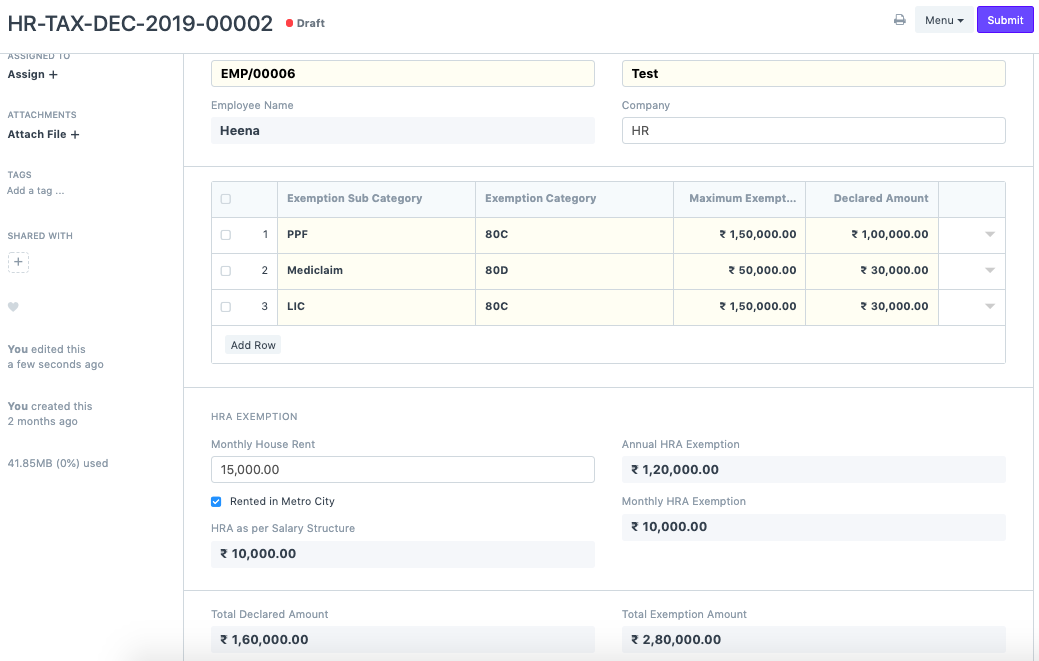
Employee Tax Exemption Declarations are automatically considered during income tax calculation.
3. Create the Income Tax Salary Component
Create a Salary Component for Income Tax and configure it as a Deduction component.
While creating the component, enable:
Variable Based On Taxable Salary
The “Variable Based On Taxable Salary” option allows Frappe HR to calculate Income Tax automatically using tax slabs and employee declarations.
When this option is enabled, the system calculates tax dynamically based on:
- Employee earnings.
- Payroll Period.
- Tax Slab configuration.
- Tax Exemption Declarations.
4. Configure the Salary Structure
After creating the Income Tax component, add it to the Salary Structure.
While configuring the deduction section:
- Add the Income Tax component.
- Leave the Amount field blank.
- Add Education Cess as a separate Salary Component if applicable.
- Configure Education Cess using a formula.
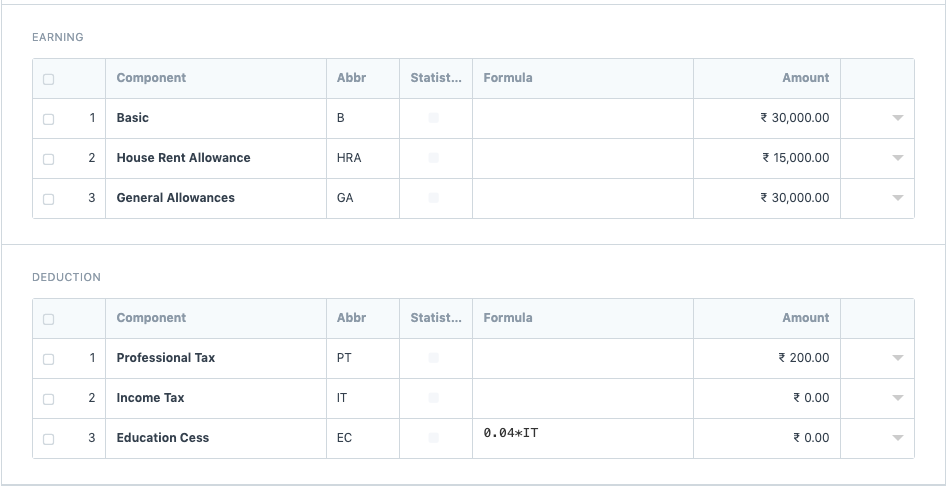
The Income Tax amount should not be entered manually. The system calculates it automatically during payroll processing.
5. Generate Payroll and Salary Slips
Once payroll configurations are complete:
- Create a Payroll Entry.
- Select the payroll period.
- Fetch employees.
- Create Salary Slips.
During salary slip generation, Frappe HR automatically calculates:
- Income Tax
- Education Cess
- Other configured tax deductions
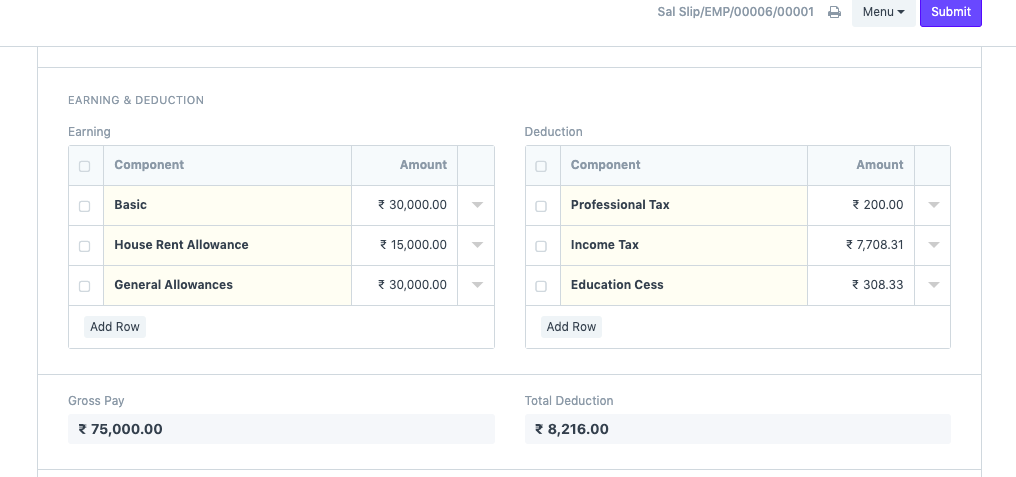
Income Tax and Education Cess are calculated automatically when Salary Slips are generated.
How Automatic Tax Calculation Works
The system uses the following information:
- Payroll Period
- Income Tax Slabs
- Employee Earnings
- Employee Tax Exemption Declarations
- Income Tax Salary Component
- Education Cess Formula
Based on these inputs, Frappe HR calculates the final tax deduction that appears in the employee’s Salary Slip.
Benefits of Automatic Income Tax Calculation
- Reduces manual tax calculations.
- Improves payroll accuracy.
- Considers employee tax-saving declarations automatically.
- Applies current tax slabs consistently.
- Calculates additional taxes and cess automatically.
NOTE
Tax calculations depend on the accuracy of the configured Income Tax Slabs and Employee Tax Exemption Declarations. Review both regularly to ensure compliance with current tax regulations.
TIP
Encourage employees to submit tax declarations at the beginning of the financial year. This helps ensure that payroll tax deductions remain accurate throughout the year and reduces year-end tax adjustments.
Related Topics
- Payroll Period
- Income Tax Slab
- Employee Tax Exemption Declaration
- Salary Component
- Salary Structure
- Payroll Entry
- Salary Slip
- Education Cess
SUMMARY
Frappe HR can automatically calculate employee income tax by using configured Income Tax Slabs, Employee Tax Exemption Declarations, and a Salary Component marked as “Variable Based On Taxable Salary”. Once these configurations are in place, payroll generation automatically calculates Income Tax, Education Cess, and other applicable tax deductions, ensuring accurate and compliant payroll processing.

