
How Working Days Are Calculated in Salary Slips
Working Days are displayed in the Salary Slip and play an important role in payroll calculations. Depending on your organization’s payroll policy, holidays can either be included in the total working day count or excluded from it.
Frappe HR provides a simple setting that allows you to control how Working Days are calculated across the organization.
Where to Configure Working Day Calculation
To configure this setting, navigate to:
HR > Setup > HR Settings
Within HR Settings, you will find the option:
Include Holidays in Total No. of Working Days
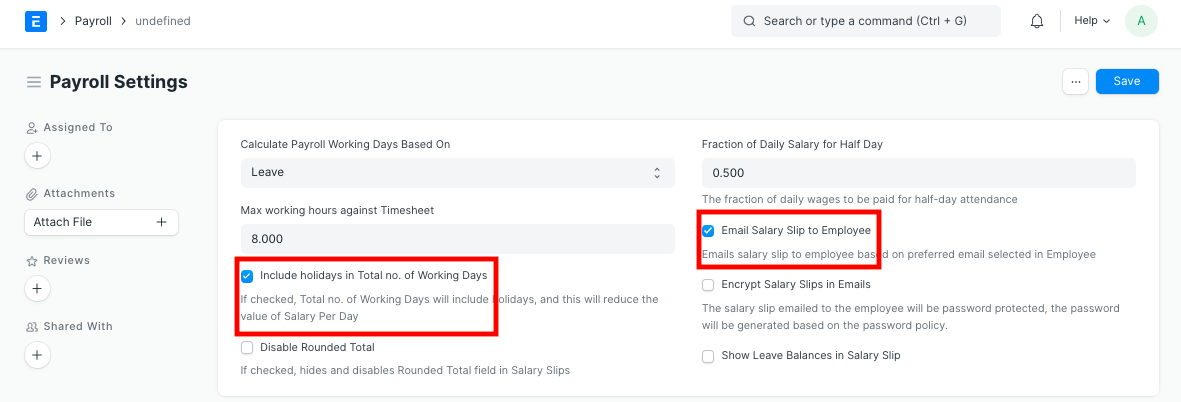
Include Holidays in Working Days
If the checkbox:
Include Holidays in Total No. of Working Days
is enabled, holidays defined for an employee will be counted as part of the total working days shown in the Salary Slip.
When this option is enabled, holidays are included while calculating Total Working Days.
This configuration is commonly used when organizations want all calendar working days and holidays to be considered during payroll calculations.
Exclude Holidays from Working Days
If the checkbox is disabled, holidays will not be included in the Working Days calculation.
When this option is disabled, holidays are excluded from the Total Working Days count.
This setup is useful when organizations prefer to calculate working days based only on actual working days, excluding holidays.
How Holidays Are Determined
The system identifies holidays based on the Holiday List assigned to the employee.
Therefore, it is important to ensure that:
- A Holiday List is created.
- The Holiday List contains all applicable holidays.
- The Holiday List is assigned to the relevant employees.
Working Day calculations depend on the Holiday List linked to the employee.
Why This Setting Matters
The Working Days calculation directly affects payroll-related figures such as:
- Payment Days
- Leave Without Pay (LWP) calculations
- Attendance-based salary calculations
- Payroll accuracy
Choosing the correct configuration ensures that salary calculations align with your organization’s payroll policies.
IMPORTANT
Changing the “Include Holidays in Total No. of Working Days” setting impacts payroll calculations for all employees using Holiday Lists.
TIP
Review your organization’s payroll policy before enabling or disabling this setting. Consistent Working Day calculations help avoid payroll discrepancies and ensure accurate salary processing.
Related Topics
- HR Settings
- Salary Slip
- Holiday List
- Leave Without Pay (LWP)
- Attendance
- Payroll Entry
- Employee Master
SUMMARY
Frappe HR allows organizations to decide whether holidays should be included in the Total Working Days calculation shown in Salary Slips. This preference can be configured in HR Settings using the “Include Holidays in Total No. of Working Days” option. The calculation relies on the Holiday List assigned to employees and can significantly impact payroll and attendance-based salary calculations.

