
Payment Entry in ERPNext
Payment Entry records the actual movement of money against invoices, orders, or other transactions.
Key Idea: Payment Entry is the official record of money received or paid in ERPNext.
Overview
Payment Entry can be used for:
- Sales Invoice (Customer Payment)
- Purchase Invoice (Supplier Payment)
- Advance Payments (Sales / Purchase Orders)
- Expense Claims
- Internal Transfers between accounts
Payment Entry is the default and recommended method for recording payments in ERPNext.
Access Path
Home > Accounting > Accounts Receivable/Payable > Payment Entry
1. Prerequisites
- Customer / Supplier master
- Bank Account setup
- Sales / Purchase Orders (if advance payment)
- Sales / Purchase Invoices
2. How Payment Entry Works
Flow: Invoice → Payment Entry → Outstanding updated automatically
On submitting Payment Entry:
- Invoice status updates to Paid / Partly Paid
- Outstanding amount is reduced
- Ledger entries are automatically created
3. Creating Payment Entry
- Open Sales or Purchase Invoice
- Click Create > Payment
- System auto-fetches party, amount, and accounts
- Save and Submit
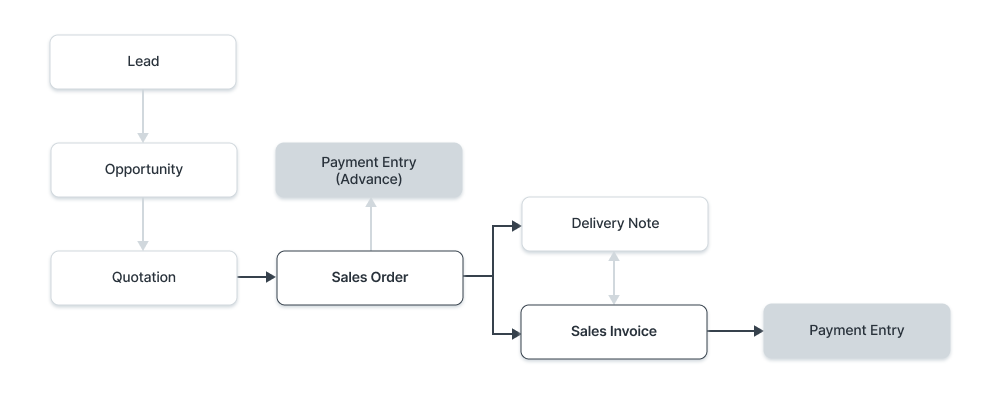
4. Manual Payment Entry
Manual entries are used when no invoice is linked initially.
- Select Party (Customer/Supplier)
- Select Bank or Cash Account
- Enter Amount
- Submit for reconciliation later
5. Key Features
5.1 Outstanding Invoices
Payment Entry can settle multiple invoices in one transaction.
5.2 Unallocated Amount
Excess payment is stored and adjusted against future invoices.
5.3 Difference Handling
Small mismatches are adjusted via Write-Off or Exchange Gain/Loss.
6. Accounting Impact
Incoming Payment:
- Debit: Bank/Cash
- Credit: Customer
Outgoing Payment:
- Debit: Supplier
- Credit: Bank/Cash
7. Important Scenarios
- Advance payments before invoice
- Partial payments after delivery
- Bulk payments for multiple invoices
- Internal transfers between accounts
8. Payment Entry vs Journal Entry
- Payment Entry is simpler and user-friendly
- Automatically handles invoices and reconciliation
- Better for foreign currency transactions
- Journal Entry is used for adjustments and manual accounting control
9. Summary
Payment Entry is the core accounting document in ERPNext that ensures accurate tracking of all money inflows and outflows while automatically updating invoices, ledgers, and outstanding balances.

